
Onboarding procedure
Candidate Knowledge Base
Create a campaign-approved source of truth for the candidate's background, policy positions, issue responses, FAQs, and approved language so voter-facing conversations remain accurate and consistent across messaging, AI-assisted support, and WhyIVote.
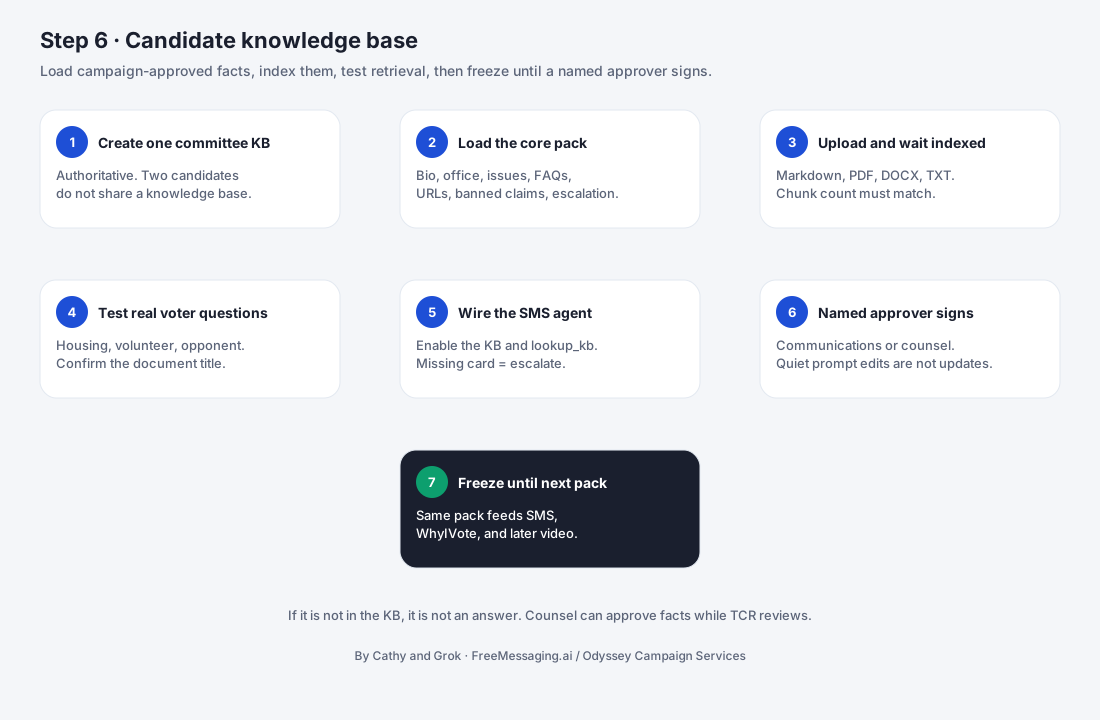

What this step accomplishes
Step 6 creates the campaign-approved knowledge layer used when FreeMessaging.ai needs to explain who the candidate is, what the candidate has approved as a position, how the campaign answers common voter questions, and when a question should be handed back to campaign staff instead of answered automatically.
This knowledge base is different from the voter CRM built in Step 5. The voter CRM answers “what do we know about this voter/contact?” The Candidate Knowledge Base answers “what has the campaign approved us to say about the candidate, the campaign, policies, issues, and FAQs?” Keeping those two knowledge layers separate makes personalization possible without mixing voter data into the candidate's approved public message.
What it covers
- 1
Core candidate and campaign facts
Candidate name, office sought, district or jurisdiction, campaign website, biography, professional/community background, campaign priorities, and other approved identity information.
- 2
Policy positions and issue knowledge
Campaign-approved positions, issue explanations, priorities, talking points, supporting details, and boundaries around topics that require additional review.
- 3
FAQs and approved responses
Common voter questions and concise, campaign-approved answers that can support two-way SMS, campaign AI experiences, phone support where enabled, and the WhyIVote candidate profile and Q&A experience.
- 4
Sources, approvals, and freshness
Each important knowledge item should preserve where it came from, who approved it, and when it was last reviewed so the campaign can update the record when positions, wording, endorsements, schedules, or other facts change.
What your campaign provides
- 1
Authorized content owner / approver
A campaign manager, communications lead, candidate, consultant, or other authorized person who can approve candidate facts, issue positions, FAQs, and voter-facing response language.
- 2
Official candidate background
Candidate biography, office sought, district/jurisdiction, campaign website, professional and community background, relevant accomplishments, and other campaign-approved profile information.
- 3
Policy and issue materials
Platform documents, issue pages, position statements, campaign memos, approved talking points, speeches, public statements, and other source material the campaign wants reflected in voter-facing answers.
- 4
Frequently asked questions and prior answers
Questions the campaign already receives from voters, donors, volunteers, press, events, social media, canvassing, or prior texting, together with any existing approved responses.
- 5
Approval rules and sensitive-topic boundaries
Direction on topics that require candidate review, legal/compliance review, staff follow-up, or a “do not answer automatically” rule.
- 6
WhyIVote profile assets and preferences
Approved candidate photo, short biography, key priorities, issue ordering, campaign links, and other information needed when the campaign will use a WhyIVote mobile candidate profile.
- 7
Language requirements
Any approved non-English source materials, translation requirements, or language-review contacts needed for multilingual voter-facing content.
- 8
Update and review expectations
The campaign contact and turnaround expectations for approving new answers and updating the knowledge base when campaign positions or facts change.
What FreeMessaging.ai handles
- Collect and inventory approved candidate, campaign, policy, issue, FAQ, and source materials provided or authorized by the campaign.
- Create a structured knowledge taxonomy covering candidate profile, office/district, priorities, policy/issue topics, FAQs, approved responses, campaign links, and escalation categories.
- Normalize overlapping source material into clear knowledge records without silently changing the campaign's substantive position.
- Draft concise answer-ready summaries and fuller supporting answers for campaign review when source material supports them.
- Attach source references, approval status, reviewer, and last-reviewed metadata to important knowledge items.
- Configure answer boundaries so unsupported, ambiguous, sensitive, or out-of-scope questions can be captured and escalated instead of improvised.
- Prepare approved knowledge for downstream uses such as Step 7 messaging design, AI-assisted SMS conversations, candidate-facing phone support where enabled, and WhyIVote candidate-profile / voter-Q&A content.
- Support campaign review, revision, approval, versioning, and re-publication as campaign facts or positions change.
- Run sample-question and coverage checks before declaring the knowledge base ready for messaging design and launch.
Information to have ready
- Authorized campaign content owner / approver
- Candidate full name, office sought, district/jurisdiction, election date, and campaign website
- Approved candidate biography and background materials
- Policy platform, issue pages, position statements, campaign talking points, and other approved source documents
- Current campaign priorities and the issues most likely to appear in voter conversations
- Existing FAQs, prior voter questions, and any approved response language
- Topics that must be escalated or not answered automatically
- Approved campaign links, social links, and contact/action destinations
- WhyIVote profile photo, short bio, issue ordering, and profile preferences if the integration will be used
- Language / translation requirements and designated reviewers where applicable
- Approval turnaround expectations and the process for urgent updates during the campaign
What you will see
Candidate profile record: Approved identity, office/district, biography, campaign links, priorities, and voter-facing profile information.
Issue and policy library: Structured campaign-approved knowledge organized by topic, with concise summaries and supporting details.
FAQ / approved-answer library: Common voter questions with approved short and full responses, plus routing rules when the question needs campaign follow-up.
Source and approval metadata: Source references, reviewer/approver, approval status, and last-reviewed information for important knowledge records.
Escalation boundaries: Topics or questions that should not be answered automatically and instead should be captured for campaign staff.
WhyIVote-ready content: Approved candidate profile, issue, FAQ, and Q&A content that can extend an SMS conversation into a mobile voter-facing candidate experience.
Channel-ready knowledge: A consistent approved knowledge layer ready to support Step 7 messaging programs and later conversational workflows.
Watch for
- The campaign has not designated a single authorized reviewer, resulting in conflicting edits or unclear approval authority.
- Candidate positions differ across the campaign website, policy documents, prior speeches, social posts, or internal talking points and the campaign has not resolved which version controls.
- The campaign provides broad policy documents but no concise approved language suitable for voter conversations, requiring additional review before deployment.
- Frequently asked voter questions are not yet documented, leaving obvious knowledge gaps that must be filled before launch.
- Sensitive topics lack clear escalation rules, creating a risk that staff and AI systems do not know when to stop and request human review.
- Candidate biography, endorsements, event details, office information, or other time-sensitive facts change after approval and the knowledge base is not updated promptly.
- Multilingual content is requested without an approved translation/review workflow for policy-sensitive language.
- The campaign wants the system to answer questions that are not supported by approved source material. Those questions should be captured and escalated rather than answered from general knowledge.
- WhyIVote candidate-profile content is treated as a separate copy instead of being tied back to the approved Candidate Knowledge Base, increasing the risk of inconsistent information across channels.
What happens next
Once the Candidate Knowledge Base is approved and validated, Step 7 - Design Messaging Programs begins. Step 5 tells FreeMessaging.ai who the campaign is contacting and what is known about each voter/contact; Step 6 provides the approved candidate knowledge that can be used to explain the candidate, answer issue questions, and continue the conversation.
During Step 7, the campaign and FreeMessaging.ai combine those two layers to define specific outreach programs for voter introduction, events, volunteers, fundraising, GOTV, issue education, and other campaign objectives. Where WhyIVote is used, the same approved Candidate Knowledge Base can also support the mobile candidate profile, issue exploration, and voter Q&A that extend the conversation beyond the original SMS thread.
The Candidate Knowledge Base remains a living campaign asset after onboarding. As new questions appear or positions and facts change, approved updates should be added to the same source so later conversations remain consistent.
Public Knowledge Base note: This procedure describes the general FreeMessaging.ai Candidate Knowledge Base onboarding workflow. Candidate-specific knowledge is private campaign content and should be published or used only in channels and contexts approved by the campaign. FreeMessaging.ai public service knowledge, campaign-specific candidate knowledge, and voter CRM data should remain separate knowledge layers.
Questions
What is Step 6 of FreeMessaging.ai onboarding?
Create a campaign-approved source of truth for the candidate's background, policy positions, issue responses, FAQs, and approved language so voter-facing conversations remain accurate and consistent across messaging, AI-assisted support, and WhyIVote.
Does this step require Odyssey Campaign Services?
No. The nine-step onboarding is part of the standard FreeMessaging.ai service. OCS is optional paid execution support.