
Onboarding procedure
Analyze & Optimize
Turn campaign messaging results into actionable data for follow-up, audience refinement, and the next round of outreach.
Roles
- Campaign priorities, success criteria, and decisions on how identified voter signals should be acted on.
- FreeMessaging.ai handles: Dashboard reporting, response classification, campaign-data capture, and performance analysis.
- Actionable campaign insights and a clearer plan for the next messaging program.
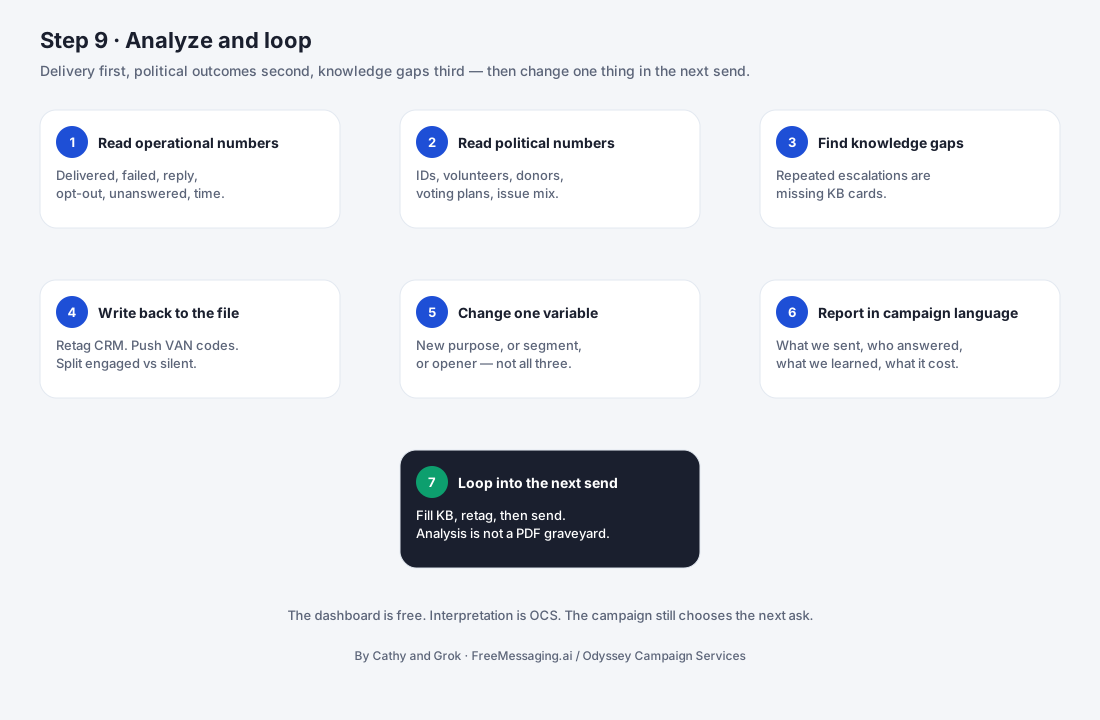

What this step accomplishes
Sending messages is only the beginning.
FreeMessaging.ai captures what happens after outreach — who replied, what voters asked about, where supporter or volunteer interest appeared, what follow-up is needed, and how different messaging programs performed.
The goal is to turn conversation activity into information the campaign can use.
Messaging → Responses → Campaign Data → Analysis → Next Action
What your campaign provides
Your campaign helps define what results matter most.
This may include:
supporter identification;
volunteer interest;
event participation;
fundraising interest;
voter questions or issue interests;
GOTV follow-up needs;
priority voter segments;
campaign-specific success criteria.
The campaign also determines how important voter signals should be handled after they are identified.
What FreeMessaging.ai handles
- FreeMessaging.ai organizes messaging and conversation data into a campaign-ready view.
- We handle:
- delivery and messaging activity reporting;
- reply capture;
- response classification;
- supporter and engagement signals;
- issue and question capture;
- follow-up status;
- campaign-level dashboard reporting;
- data export or handoff where applicable;
- identification of patterns that can inform future outreach.
- The objective is not simply to report how many texts were sent. It is to show what the campaign learned from the conversations.
Step-by-step process
Step 1 — Collect Messaging Data
FreeMessaging.ai consolidates messaging activity and voter-response data generated by the campaign.
Typical data includes:
Sent → Delivered → Replies → Classified Responses → Follow-Up
Step 2 — Classify Voter Responses
Replies are organized into useful campaign signals.
Examples can include:
Supporter
Undecided / Needs More Information
Volunteer Interest
Event Interest
Donor Interest
Issue Question
Follow-Up Required
Opt-Out
Classification allows the campaign to move beyond an unstructured inbox.
Step 3 — Update the Voter CRM
Relevant conversation results are written into campaign records.
Depending on the messaging program, this can include:
Supporter Status Issue Interest Volunteer Interest Conversation History Follow-Up Need Last Contact Messaging Program
The voter CRM becomes the campaign's working memory for future outreach.
Step 4 — Review the Dashboard
The dashboard provides a consolidated view of campaign messaging activity and results.
Campaign teams can review signals such as:
messages sent;
delivery activity;
reply activity;
response classifications;
identified supporters;
issue interests;
volunteer or event interest;
follow-up workload;
performance by messaging program or audience segment.
The dashboard should help answer:
Who responded? What did we learn? What needs action next?
Step 5 — Identify Follow-Up Opportunities
Analysis should produce an action list, not just a report.
For example:
Supporter identified → move into supporter follow-up or GOTV workflow.
Volunteer interest → route to volunteer follow-up.
Issue question → provide campaign-approved information or connect to the candidate knowledge base / WhyIVote experience where appropriate.
Event interest → send event details and reminders.
Needs more information → continue the conversation using approved campaign content.
Step 6 — Compare Messaging Programs
Campaigns can compare results across different objectives and audiences.
For example:
Voter Outreach Event Promotion Volunteer Recruitment Fundraising GOTV
The objective is to understand which audience, message, timing, or conversation path produced the most useful campaign response.
Step 7 — Optimize the Next Outreach
Insights from the current messaging program feed directly into the next one.
The campaign may decide to:
expand a responsive voter segment;
refine targeting;
adjust message wording;
answer recurring voter questions;
strengthen follow-up;
change timing;
create a new WhyIVote issue resource;
launch another messaging program;
expand SMS capacity.
This creates a continuous operating loop:
Design → Launch → Converse → Capture → Analyze → Improve → Launch Again
What you will see
The campaign dashboard should make the most important information easy to understand.
A typical view may include four areas:
Messaging Activity
Sent, delivery activity, replies, and conversation volume.
Voter Signals
Supporters, volunteers, issue interests, questions, and other identified responses.
Follow-Up
Contacts requiring additional campaign action.
Program Performance
Results by messaging program, audience, or campaign objective.
The dashboard is designed to help the campaign move from message volume to campaign intelligence.
What happens next
Step 9 is the final onboarding step, but it is not the end of the messaging process.
The analysis becomes the starting point for the next campaign decision:
What should we do next?
That might mean:
Follow up with identified supporters
or
Expand outreach to another voter segment
or
Create a new event / volunteer / fundraising / GOTV messaging program
or
Use recurring voter questions to strengthen the Candidate Knowledge Base and WhyIVote content
So after the first program launches, FreeMessaging.ai moves from onboarding into an ongoing cycle of:
Reach → Converse → Learn → Follow Up → Improve
Completion Output
Step 9 is operating successfully when campaign messaging data is being captured, organized, reviewed, and turned into defined follow-up or next-outreach decisions.
The output is not simply a dashboard.
The output is:
Campaign data → Campaign insight → Campaign action
← Step 8: Launch & Manage Conversations
Continue the Cycle: Design the Next Messaging Program →
Questions
Can campaign staff access the results? Campaign results are organized through the FreeMessaging.ai dashboard and campaign data workflows established during onboarding.?
Does analysis update the voter CRM? Relevant conversation and classification data can become part of the voter record so future outreach has context.
Can we compare different messaging programs? Yes. Different outreach objectives and audience segments can be reviewed separately where the campaign structure and available data support it.?
Does optimization happen only once? No. Analysis and optimization are ongoing. Each round of outreach can inform the next.