
Onboarding
In-Kind Agreement to Analysis
Agreement, Campaign Verify, 10DLC, contact data, voter CRM, candidate knowledge, messaging programs, launch, and analysis — with a $0 platform fee.

Sign a written agreement, then run Campaign Verify and 10DLC in parallel with contact integration, the voter CRM, and the candidate knowledge base. Design message formats and send a pilot once 10DLC is approved, then analyze results and continue the loop.
This playbook is how a political texting program is stood up on FreeMessaging.ai. The platform is $0 platform fee, no software markup, no extra managed-sending fee. Campaigns can run every step self-serve, or operate the same path with their own staff: registration, data, knowledge, conversation design, and analysis.
Not legal, treasury, or compliance advice. Carrier, TCR, Campaign Verify, FEC, and state rules change; confirm current requirements with counsel and the treasurer before you file or send.
How the work runs
Four phases
The in-kind agreement comes first. Campaign Verify, 10DLC, contacts, Vote CRM, and the knowledge base then run in parallel. The first send waits until 10DLC is approved.
Phase A · Governance
Sign before you build
The in-kind donation agreement is the only serial start. It sets value, data rights, approvals, and who is authorized to file and to text.
Phase B · Parallel build
Three tracks at once
Compliance (CV token → 10DLC), data (contacts → Vote CRM), and knowledge (candidate KB) run together. Do not freeze CRM or scripts while 10DLC is pending.
Phase C · Conversation
Design, then a pilot send
Message formats are designed on live CRM segments and an approved KB. The initial message goes out only after 10DLC is approved — to one defined universe, not the whole file.
Phase D · Learn
Analysis is a loop
Delivery, replies, opt-outs, issues, and conversions feed Vote CRM tags, knowledge gaps, and the next send. The dashboard is free. Interpretation is OCS.
| Step | Phase | Why |
|---|---|---|
| 1. In-kind agreement | Phase A (blocking) | Legal and value gate. Nothing else starts. |
| 2. CV token | Phase B compliance | Identity vetting. Needed before 10DLC political use-case. |
| 3. 10DLC application | Phase B compliance | Send lock. Do not wait to build CRM/KB while this is pending. |
| 4. Contact integration | Phase B data (parallel) | VAN / DataTrust, self-owned, or 360AI Media can load during CV review. |
| 5. Vote CRM dashboard | Phase B data (parallel) | Depends on contacts, not on TCR approval. |
| 6. Knowledge base | Phase B knowledge (parallel) | Counsel can approve facts while the registry thinks. |
| 7. Message formats | Phase C (after CRM + KB) | Purpose and reply tree. Drafts can start; live send cannot. |
| 8. Initial message | Phase C (after 10DLC approved) | Pilot segment only. |
| 9. Analysis | Phase D loop | Feeds CRM, KB, formats, and the next send. |
Flowchart
Service playbook at a glance
After the agreement, compliance, data, and knowledge run in parallel. They join at a send gate, then the conversation and the analysis loop.
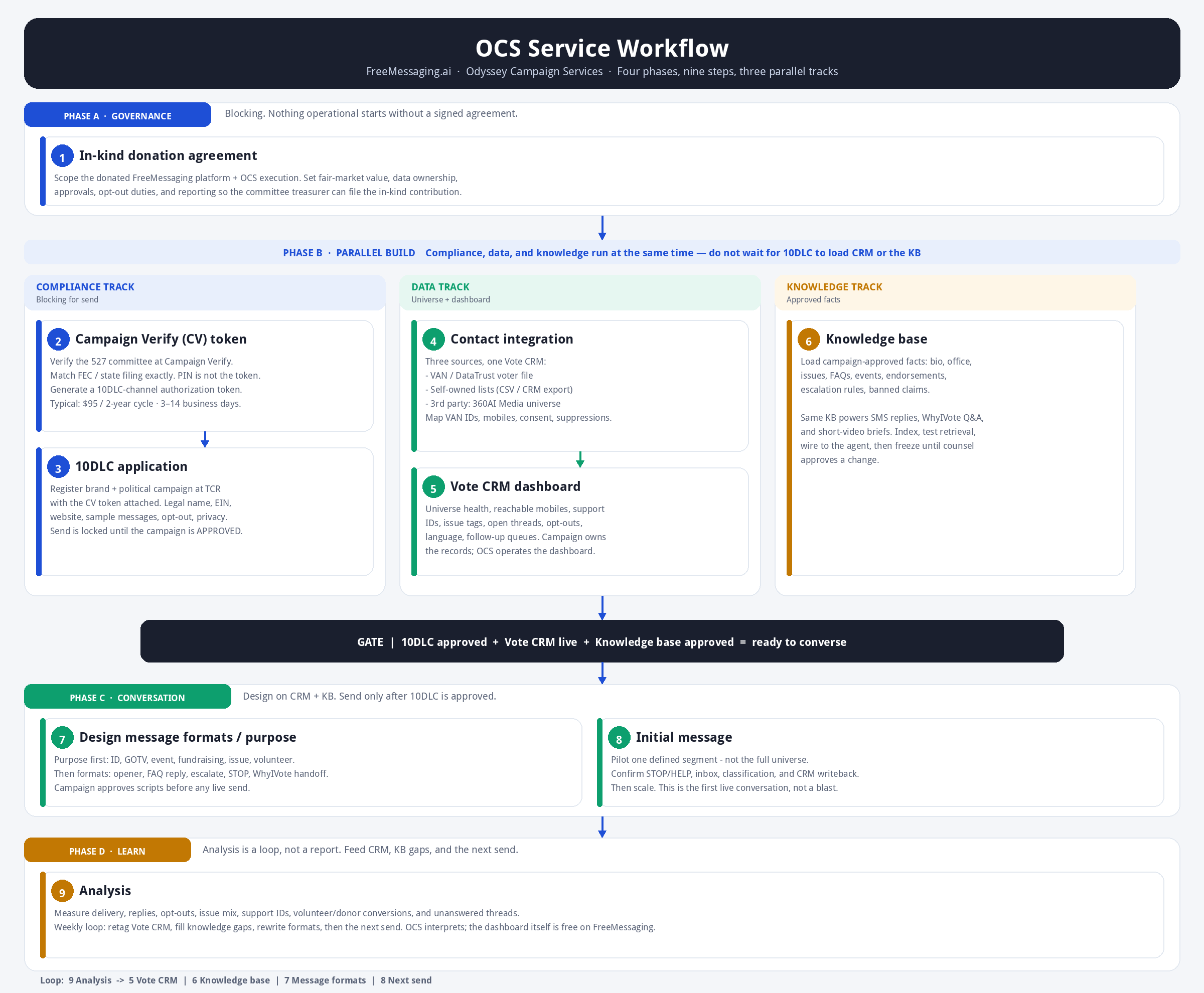
In-kind donation agreement
Read the full Step 1 article →
- Who
- Campaign treasurer + counsel · OCS prepares the schedule
- Calendar
- 1–5 business days after the campaign is ready to sign
OCS and FreeMessaging can donate platform access and execution below the usual charge. Under FEC rules, goods or services offered free or at less than the usual charge are an in-kind contribution, valued at the prevailing commercial rate, and they count against contribution limits. The committee cannot report what it was never told.

Prerequisites
- Authorized committee (FEC or state/local) with a treasurer
- EIN and committee legal name as filed
- Named campaign officers who may approve messaging and data use
- what is donated vs. what the campaign still pays (carrier, 10DLC, Campaign Verify, numbers, disclosed AI usage)
Step-by-step
1.Name the parties and the committee, not a candidate personally
The agreement is with the authorized committee. Capture legal name, FEC or state ID, EIN, treasurer, and the campaign officer who will sign Campaign Verify and 10DLC forms.
2.Write the donated work as a schedule, not a slogan
List what OCS is donating: FreeMessaging account setup, CV/10DLC filing assistance, Vote CRM configuration, knowledge-base ingest, conversation design, managed reply ops if included, and analysis. List what is not donated: carrier SMS, numbers, TCR/10DLC fees, the Campaign Verify fee, and any disclosed AI usage.
3.State fair-market value and the discount
FEC guidance values services at the prevailing commercial rate at the time they are rendered. Put the usual charge, the amount billed (often $0 for donated execution), and the in-kind amount on a one-page value schedule. OCS notifies the committee of that value so the treasurer can monitor aggregates and report.
4.Lock data ownership and allowed sources
The campaign owns its contacts and conversation records. Spell out the three contact paths that may be loaded: VAN or DataTrust, self-owned files, and a 360AI Media third-party universe. Require written permission before any list leaves the committee’s control.
5.Assign approvals, opt-outs, and escalation
Campaign counsel approves issue language and contrasts. The campaign remains responsible for lawful use, STOP/HELP, and election-advertising rules. OCS executes; it does not replace the general consultant or treasurer.
6.Set duration, reporting cadence, and termination
Tie the gift to the election cycle. Require a monthly in-kind notice to the treasurer. Include a kill switch: the campaign can freeze sending immediately; OCS will export CRM and KB on request.
Done when
- Signed agreement + value schedule in the treasurer’s file
- Authorized signers named for CV, 10DLC, and message approval
- Data-source schedule (VAN/DataTrust, self-owned, 360AI Media) initialed
- Campaign notified of in-kind value for reporting
Common stalls
- Signing as the candidate instead of the committee
- No FMV number — the treasurer then cannot file
- Undefined data sources, especially a 360AI Media universe with no usage grant
- Assuming “free platform” means carrier and 10DLC fees are donated. They are not.
Campaign Verify (CV) token
Read the full Step 2 article →
- Who
- Authorized committee officer · OCS walks the filing
- Calendar
- Typically 3–14 business days after a clean filing; PIN by mail can add 5–10 days
U.S. wireless carriers require political 527s using A2P 10DLC (and, as of 2026, short code and toll-free in many cases) to obtain a Campaign Verify authorization token. The token unlocks the political special use-case at The Campaign Registry. Without it, political traffic is treated as unvetted and is filtered or fined.
Prerequisites
- Signed in-kind agreement (Step 1)
- Public filing URL (FEC.gov or state/local election authority)
- Legal name, EIN, and address that match the filing exactly
- Authorized requester who can receive the PIN
Step-by-step
1.Create the Campaign Verify account
Go to app.campaignverify.org (or campaignverify.org/get-started). Use a committee email, not a personal Gmail if you can avoid it. One account per entity.
2.Start a New Verification Request
Choose Federal or State/Local/Tribal to match how the committee is actually filed. If both apply, pick the filing you will use for identity match — then keep every field identical to that record.
3.Paste the public filing URL and copy the record fields
Committee name, address, EIN, and treasurer must match the public record character-for-character. Nicknames, missing “Inc.”, or a campaign HQ address that is not on the filing are the usual rejections.
4.Pay the verification fee
Campaign Verify charges $95 per entity per two-year election cycle. This is a pass-through hard cost, not a FreeMessaging platform fee. The campaign (or the in-kind donor, if the agreement says so) pays it.
5.Receive the PIN — it is not the token
Campaign Verify reviews the filing and emails a PIN (or mails it). Log back in, open the verified campaign, enter the PIN, and click Verify. Do not paste the PIN into TCR.
6.Generate a 10DLC-channel authorization token
Select the 10DLC channel and click Create an Authorization Token. The token is a long cv|1.0|tcr|10dlc|… string. Copy it once, store it in the campaign vault, and give it to OCS. Tokens are typically one-time use; generate a new one if you add another vendor.
Done when
- Committee shows as verified in Campaign Verify
- 10DLC-channel token starting with cv| is in the vault
- Token has not been consumed by another CSP
Common stalls
- Name/EIN mismatch with the FEC or state filing
- Treating the 6-digit PIN as the token
- Generating a short-code or toll-free token when you need 10DLC
- Starting 10DLC before the token exists
10DLC application
Read the full Step 3 article →
- Who
- OCS files through FreeMessaging · campaign confirms legal identity
- Calendar
- Brand often same day once the CV token is attached; campaign use-case commonly 2–10 business days, longer in peak season
10DLC (10-digit long code) is the U.S. A2P registration path at The Campaign Registry. Political programs register a brand and a campaign so carriers can identify the traffic. Unregistered or mis-registered political SMS gets filtered. FreeMessaging includes the workflow; it does not skip the registry.
Prerequisites
- Unused Campaign Verify 10DLC token (Step 2)
- Legal name, EIN, address, website, privacy policy, and messaging terms
- Sample messages and a documented opt-in / opt-out practice
- Expected volume and number plan
Step-by-step
1.Confirm the political-entity path
If the organization is a 527 registered with the FEC or a state/local election authority, answer yes to political entity. That reveals the Campaign Verify token field. 501(c) advocacy orgs are a different path — do not force a political token onto a non-527.
2.Paste the CV token, then register the brand
Legal name, EIN, address, and website must match the CV filing. Brand registration tells TCR who is sending. Do not invent a DBA that is not on the committee record.
3.Register the political campaign use-case
Attach sample outbound messages, the opt-in description, STOP/HELP language, privacy policy URL, and support contact. Use the real opener you will send in Step 8, not placeholder lorem ipsum.
4.Provision numbers only onto an approved campaign
Associate 10-digit numbers after the campaign use-case is approved. Sending before approval is how programs get blocked the week they needed throughput.
5.Record the pass-through costs
TCR brand and campaign fees, plus carrier vetting, are hard costs. FreeMessaging does not mark them up as software. Put them on the treasurer’s in-kind / expenditure worksheet.
6.Do not claim “live in 24 hours”
OCS will not. Calendar time is the point of running this track in parallel with CRM and knowledge. The send gate stays closed until status is APPROVED.
Done when
- Brand approved at TCR
- Political campaign use-case approved
- Numbers associated
- STOP and HELP tested on a staff handset
Common stalls
- Sample messages that do not match what you later send
- Missing privacy policy or terms URL
- Reusing a consumed CV token
- Blasting a list the day the form is submitted
Contact integration
Read the full Step 4 article →
- Who
- Campaign data director · OCS maps and loads
- Calendar
- Same day for a clean CSV; 2–5 days for VAN / DataTrust API + field mapping
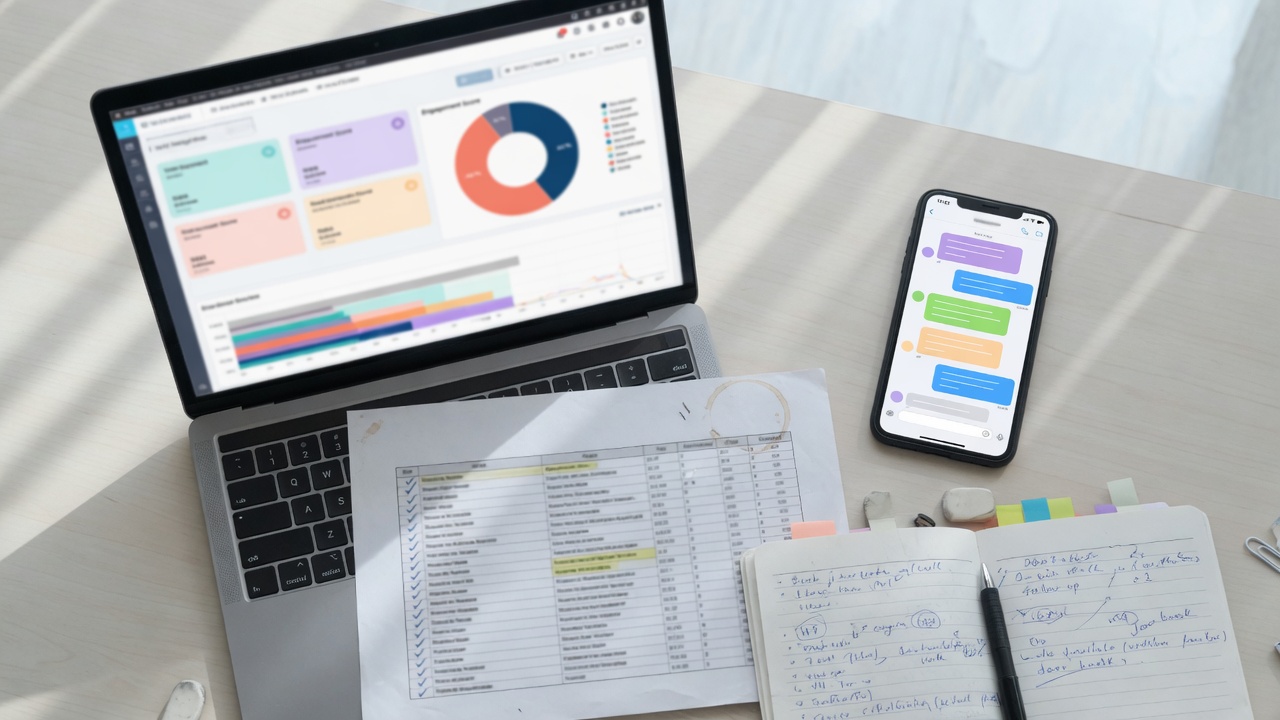
A texting program without a join key is a blast. Contacts must land in one Vote CRM with a stable ID, a reachable mobile, a consent/source flag, and suppressions. Three sources are supported. They are not interchangeable.
Prerequisites
- Data-source schedule from the in-kind agreement
- Named owner for each file (VAN admin, campaign CSV, 360AI Media)
- Cell vs landline distinction, or a plan to classify
Step-by-step
1.Pick the source for this universe — do not mix blindly
VAN / DataTrust for the registered-voter file. Self-owned for events, donors, petitions, and website opt-ins. 360AI Media for a third-party universe (for example small-business or community contacts) that the agreement explicitly allows.
2.export with a voter ID
In VAN, create the list, include VAN ID, cell, name, district, party/score fields you actually use, and any activist codes you will write back. Request an API key from Integrations if you want a live sync. DataTrust subscribers export the equivalent national ID + cell + scores under their cooperative rules. Keep the vendor’s use limits; a voter file is not a marketing list.
3.require a source and a date
Every row needs first name, mobile, source (event, donor CRM, web form), source date, and — if you have it — an opt-in flag. Drop rows with no mobile. Do not SMS a home landline because it was the only phone on the clip.
4.load only what the agreement grants
OCS/360AI Media can contribute a modeled or compiled universe (local small businesses, community contacts, and similar). Put the file name, geography, and permitted use on the data schedule. Resulting conversation data still belongs to the campaign.
5.Normalize, then suppress
E.164 phones, drop duplicates by mobile, apply the campaign’s DNC / prior STOP file, and flag unknowns. Map the join key: VAN ID, DataTrust ID, or a campaign contact UUID. That key is how replies write back in Step 5.
6.Pilot the file, not the whole state
Load a defined segment first (one district slice, one language, or one support band). Full-universe load waits until the pilot inbox in Step 8 is clean.
Done when
- Each row has a join key, a mobile, and a source
- Landlines and STOP numbers are out of the sendable universe
- VAN / DataTrust IDs preserved for write-back
- 360AI Media rows tagged with source = third_party_360ai
Common stalls
- Excel files with merged cells and three phone columns
- VAN export without VAN ID
- Loading a 360AI Media file the treasurer never approved
- Treating a voter file as SMS-consented because it has a cell
Vote CRM dashboard
Read the full Step 5 article →
- Who
- OCS configures · campaign owns the records
- Calendar
- Hours after a clean load; taxonomy takes a working session with the campaign
The point of two-way SMS is campaign data, not a sent count. Vote CRM is where replies become support IDs, issue tags, volunteer/donor flags, and a follow-up queue. FreeMessaging includes basic CRM and reporting. OCS is paid for the operating model: taxonomy, queues, hygiene, and interpretation.
Prerequisites
- Contacts loaded (Step 4)
- Campaign’s support scale (1–5 or ID/Lean/Undecided/Opposed)
- Issue list the candidate will actually answer
Step-by-step
1.Confirm the objects, not just the grid
Every person has a contact record, a conversation, tags, and a next action. If a reply cannot land on a person, the dashboard is a log — not a CRM.
2.Install the campaign taxonomy
Support level, issues (from the knowledge base, not invented on the fly), language, volunteer interest, donor interest, event RSVP, voting plan, and escalation (press, legal, opposition research). Keep the list short enough that operators will use it.
3.Build the operator dashboard
Universe size, reachable mobiles, delivery, reply rate, opt-out rate, open threads, unanswered >2 hours, support IDs this week, top issues, language mix. This is the screen the campaign manager sees without opening a spreadsheet.
4.Create follow-up queues
Unanswered questions, donation interest, volunteer yes, voting-plan incomplete, escalation. A queue without an owner dies. Name the OCS operator or campaign staffer for each.
5.Wire write-back if VAN / DataTrust is in play
Map SMS outcomes to activist codes or survey questions. Test five dummy replies and confirm they appear in VAN within the vendor’s sync window before trusting a live program.
6.Lock roles
Campaign leadership sees the dashboard. Operators handle the inbox. Counsel sees escalations. Nobody else exports the file without the data director.
Done when
- Dashboard live on the campaign account
- Taxonomy agreed and loaded
- Queues have owners
- A test reply writes to the contact and, if used, to VAN
Common stalls
- Twenty issue tags no one will apply
- No owner for the unanswered queue
- Exporting the full file to a volunteer laptop
- Confusing the free dashboard with OCS analysis (that is Step 9)
Knowledge base
Read the full Step 6 article →
- Who
- Campaign communications / counsel approve · OCS ingests
- Calendar
- 1–3 days for a first approved pack; retrieval tests the same day as upload
AI replies are only as safe as the approved facts. The candidate knowledge base is the single source for SMS answers, WhyIVote Q&A, and later short-video briefs. Unapproved copy does not go in. If it is not in the KB, the agent escalates instead of inventing.
Prerequisites
- Campaign-approved bio, office, district, election date
- Issue positions and banned claims
- Escalation rules (legal, press, donations, opposition)
Step-by-step
1.Create the campaign knowledge base as authoritative
In the portal Knowledge dashboard, create one authoritative KB for this committee. Do not mix two candidates. Optional secondary KBs (district facts, GOTV logistics) stay non-authoritative until counsel says otherwise.
2.Load the core pack
Biography and public-service background, reason for running, office and district, election calendar, priority issues, approved FAQs, events, endorsements, donation and volunteer URLs, WhyIVote candidate page, and a banned-claims list (what the agent must never say).
3.Upload files the way the pipeline expects
Paste markdown or upload PDF/DOCX/MD/TXT. Wait until status is indexed and embedded chunk count matches chunk count. Use Test retrieval on the same page with real voter questions (“What is her position on housing?”) before anyone texts.
4.Wire the KB to the SMS agent
On the agent, check this KB under enabled knowledge bases and keep lookup_kb on. The prompt must say: answer only from knowledge cards; if the card is missing, escalate. Never invent a position.
5.Freeze until a named approver signs the pack
Communications director or counsel initials the pack. After that, every change is a new document plus a re-test, not a quiet edit in a prompt. Rapid-response copy follows the same gate.
6.Reuse it
The same approved KB feeds WhyIVote Q&A and OCS short-video briefs. That is the point of building it before the first send, not after the first wrong answer.
Done when
- Authoritative KB indexed in the portal
- Test retrieval returns the right document titles
- SMS agent has the KB enabled and lookup_kb on
- Named campaign approver has signed the pack
Common stalls
- Loading a website scrape with stale or off-message pages
- Prompt-stuffing the bio instead of uploading a KB
- No banned-claims list
- Letting the agent guess when retrieval is empty
Design message formats / purpose
Read the full Step 7 article →
- Who
- OCS drafts · campaign approves every live template
- Calendar
- One working session for a pilot purpose; a full matrix takes several days
Purpose first, copy second. A GOTV reminder, an ID ask, an event RSVP, and a donor follow-up are different formats. FreeMessaging includes basic templates. OCS is paid for conversation-flow design: opener, replies, escalation, WhyIVote handoff, and STOP — mapped to Vote CRM tags.
Prerequisites
- Live Vote CRM segments (Step 5)
- Approved knowledge base (Step 6)
- 10DLC samples should match this copy (Step 3) — update TCR if they drifted
Step-by-step
1.Name the purpose of the first conversation
Pick one: identify support, invite an event, recruit volunteers, explain one issue, or GOTV (ballot / early vote / Election Day). A first send that tries to do all five is a newsletter, not a conversation.
2.Write the format matrix, not a single script
Opener (who you are, why this number, the ask). Expected replies (yes / no / question / stop). FAQ replies drawn from the KB. Escalation (human). WhyIVote handoff for long issue questions. Required STOP and HELP. Follow-up if silent after N days.
3.Segment the opener
Language, geography, and support band change the first line. The knowledge stays the same; the ask does not. Keep VAN/DataTrust fields available for mail-merge without inventing a first name you do not have.
4.Bind each reply to a CRM action
“I’m in” → support ID + queue. Issue question → tag + KB answer or WhyIVote link. “How do I donate?” → donor queue, not a long SMS pitch if the agreement says otherwise. STOP → suppress immediately.
5.Stay inside registered samples and opt-out rules
The live opener must be recognizable as the 10DLC sample. Include the committee name and opt-out language the carriers expect. This is not a loophole around A2P.
6.Get a written approval
Campaign communications initials the matrix. Store it next to the KB pack. OCS does not send unapproved copy, including “small tweaks” on send day.
Done when
- One purpose for the pilot
- Opener + reply tree + STOP/HELP approved
- Each reply path has a Vote CRM tag or queue
- Copy matches 10DLC samples closely enough to not surprise TCR
Common stalls
- Writing 12 openers before the purpose is named
- No STOP language because “it’s P2P”
- Issue answers that are not in the KB
- A link-shortener the carriers will filter
Initial message
Read the full Step 8 article →
- Who
- OCS operates the send · campaign is on-call for escalation
- Calendar
- Same day once the send gate is green; inbox watch for the first 2–4 hours
The first live send is a systems test that also starts voter conversations. It is not the full program. Prove delivery, STOP, classification, CRM write-back, and KB answers on a defined segment. Then scale.
Prerequisites
- 10DLC campaign APPROVED and numbers associated (Step 3)
- Pilot segment loaded (Steps 4–5)
- Approved opener (Step 7)
- KB retrieval tested (Step 6)
Step-by-step
1.Check the send gate out loud
Agreement signed. CV token used. 10DLC approved. STOP works on a staff phone. Pilot list has mobiles only. Opener approved. Inbox staffed. If any box is open, do not send.
2.Send to a staff seed list first
Campaign manager, treasurer, OCS operator, and one unused handset. Confirm from-name/number, link, STOP, HELP, and that the reply lands in the shared inbox — not a personal phone.
3.Launch the defined pilot segment
One universe, one purpose, limited volume. Use FreeMessaging send. There is no extra managed-sending fee. Carrier costs still apply.
4.Watch the inbox as an operation, not a curiosity
Classify replies (AI-assisted is included). KB answers routine questions. Escalate anything the KB does not cover, plus press, legal, and donation processing. Apply Vote CRM tags as you go.
5.Honor STOP in real time
Suppression is platform infrastructure. Confirm the number is out of every future segment, including VAN write-back if that is in scope.
6.Hold the rest of the file
Do not “just add the other 80,000” the same afternoon. Step 9 reads the pilot first.
Done when
- Pilot delivered with a known delivery and reply rate
- STOP verified end-to-end
- Replies tagged in Vote CRM
- No unapproved answers left the KB
Common stalls
- Sending before 10DLC approval because “it’s a small test”
- Replies dying in a personal iMessage thread
- The opener promising a human who is not on shift
- Scaling the universe before opt-out and classification are proven
Analysis
Read the full Step 9 article →
- Who
- OCS interprets · campaign decides the next ask
- Calendar
- Same-day pulse after the pilot; weekly loop for the rest of the cycle
A dashboard is not a decision. Analysis turns delivery, replies, and silence into the next universe, the next format, and the next knowledge card. Basic reporting is free on FreeMessaging. Advanced interpretation and optimization are OCS.

Prerequisites
- At least one completed send (Step 8)
- Vote CRM tags actually applied
- A named weekly review with the campaign
Step-by-step
1.Read the operational numbers first
Attempted, delivered, failed, reply, opt-out, median time-to-first-reply, unanswered, escalations. If delivery is weak, do not rewrite the script — check 10DLC, numbers, and the file.
2.Read the political numbers second
Support IDs, undecideds who asked a question, volunteer yes, donor interest, voting-plan complete, issue mix. These only exist if Step 5 taxonomy was used.
3.Find the knowledge gaps
Every unanswered or escalated question that is not unique is a missing KB card. Draft, approve, ingest, re-test retrieval. That is cheaper than a wrong AI answer.
4.Write back to the file
Retag Vote CRM. Push activist codes to VAN / DataTrust if that was in the integration. Suppress STOPS. Split the next universe (engaged vs silent vs ID’d).
5.Change one thing in the next send
New purpose, new segment, or a tighter opener — not all three. Tie it back to Step 7. Keep 10DLC samples in range.
6.Report in campaign language
OCS’s weekly note is: what we sent, who answered, what we learned, what we will do, what it cost in pass-through fees. Not a vanity “impressions” slide.
Done when
- Pilot memo with delivery, reply, opt-out, and ID counts
- KB updates queued for anything the agent could not answer
- Next segment and purpose named
- Treasurer has the period’s in-kind / pass-through snapshot
Common stalls
- Optimizing copy when the file was landlines
- No tags, so “analysis” is only a send count
- Skipping the loop because Election Day is close — that is when the loop matters
- Treating WhyIVote clicks as a substitute for CRM IDs
Who does what
FreeMessaging is the capability. OCS is the operator. The campaign still owns legal identity, data, and message approval.
| Work | Campaign | OCS | FreeMessaging platform |
|---|---|---|---|
| In-kind reporting | Treasurer files | Provides FMV schedule | Not involved |
| CV token | Authorized officer | Guides the filing | Stores the token for 10DLC |
| 10DLC | Confirms legal identity | Submits brand + campaign | Registration workflow |
| Contacts | Grants VAN / files / 360AI use | Maps and loads | Upload + API |
| Vote CRM | Owns records, sets taxonomy | Configures queues | Dashboard, tags, export |
| Knowledge base | Approves every fact | Ingests and tests retrieval | Upload, embed, lookup |
| Formats | Approves live copy | Designs the conversation | Templates + inbox |
| Initial message | On-call for escalation | Runs the pilot send | Send, STOP, shared inbox |
| Analysis | Chooses the next ask | Interprets and recommends | Basic reporting |
Related reading: 10DLC for political campaigns, Campaign Verify tokens, and how FreeMessaging setup works.
Questions on this workflow
Do we wait for 10DLC before building Vote CRM and the knowledge base?
No. Campaign Verify and 10DLC take calendar time. If you wait to load VAN, build Vote CRM, or approve the knowledge base until the registry says yes, you waste the only days you had. Steps 2–6 run as three tracks after the agreement. The send still waits on 10DLC approval.
Is the in-kind donation required to use FreeMessaging?
No. Campaigns can start free and self-serve on FreeMessaging.ai, pay pass-through carrier and registration costs, and never hire OCS. The in-kind agreement is how OCS donates execution and setup to a committee. Self-serve users still complete CV/10DLC and upload their own lists.
Who pays Campaign Verify and 10DLC?
Those are required telecommunications / identity-vetting charges. FreeMessaging does not mark them up as a platform fee. The campaign pays them unless the in-kind schedule expressly says OCS is covering a specific fee. The CV fee is $95 per entity per two-year cycle.
What is the difference between VAN, DataTrust, self-owned, and 360AI Media?
VAN (including VoteBuilder / SmartVAN) and DataTrust are voter-file ecosystems the campaign already subscribes to. Self-owned is the campaign’s own CRM, events, and opt-ins. 360AI Media is a third-party universe OCS may load only when the agreement grants it. All four land in the same Vote CRM with a source tag and a join key.
When can we send the first text?
When the send gate is green: signed agreement, unused CV token consumed by an approved 10DLC campaign, numbers on that campaign, STOP verified, a defined mobile segment in Vote CRM, an approved opener, and a staffed inbox. Not before.
Next
Start a free political texting program
Self-serve on FreeMessaging.ai with a $0 platform fee. Use this playbook for agreement, CV/10DLC, Vote CRM, knowledge, conversation design, and analysis.
Platform fee is $0. No additional managed-sending fee for the standard platform service. Carrier, number, registration, compliance charges, and any disclosed AI usage fee may apply.