
Onboarding procedure
Campaign Verify
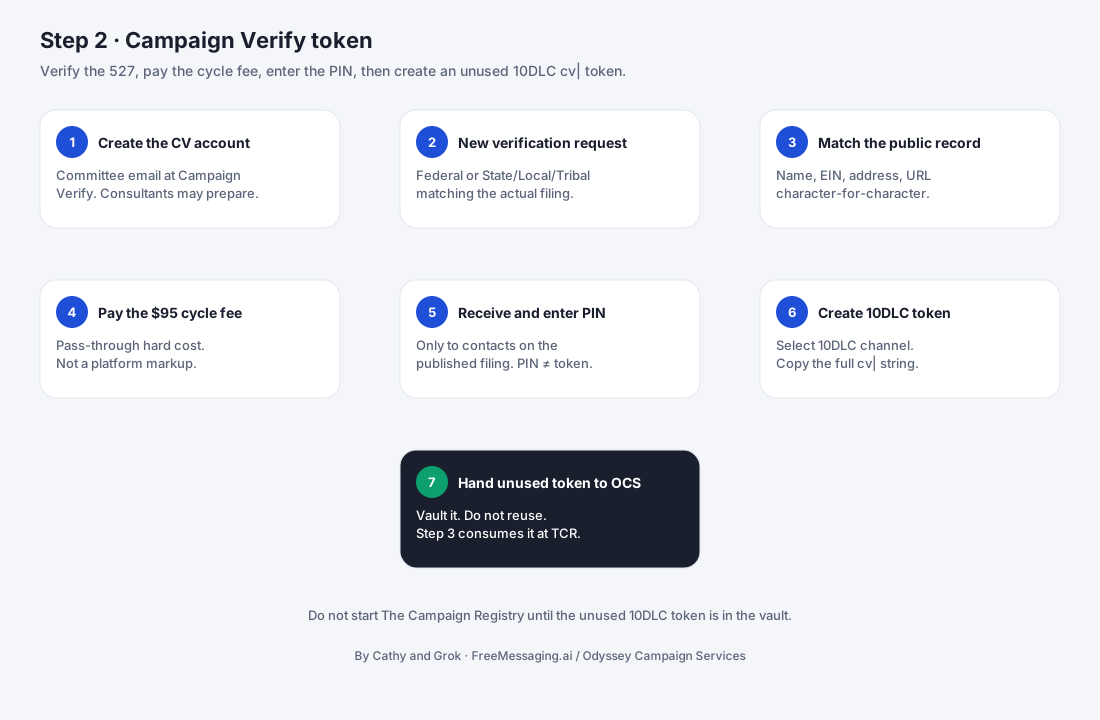
Verify the political campaign and obtain the Campaign Verify Authorization Token needed for the applicable political messaging registration path before 10DLC / Twilio setup begins.

What this step accomplishes
Campaign Verify validates that a U.S. political organization is who it says it is and issues an Authorization Token that can be used by messaging providers and registration systems as evidence of that verification.
For an applicable 527 political campaign using A2P 10DLC, the CV Token is used in the registration flow that unlocks the Political special use case. This step therefore sits between the signed FreeMessaging.ai onboarding agreement and the campaign’s 10DLC / Twilio registration.
The objective is to obtain the correct, current token for the intended messaging channel and securely prepare it for Step 3.
What your campaign provides
- 1
Official campaign / committee identity
Legal or registered committee name, candidate/committee type, office or political purpose, and jurisdiction information as applicable.
- 2
Authorized representative
The individual authorized to submit or complete the Campaign Verify identity-verification process for the committee.
- 3
Official campaign channels
Campaign website, official email address, phone number, mailing address, and other public-facing information requested in the verification flow.
- 4
Registration identifiers
Committee registration information and identifiers requested by Campaign Verify for the specific federal, state, local, or tribal committee type.
- 5
Messaging channel confirmation
Confirmation that the requested token should be created for 10DLC (or another channel if the campaign uses a different messaging path).
- 6
Verification approvals / payment
Campaign approval to submit the request and payment of Campaign Verify’s current verification fee where applicable.
What FreeMessaging.ai handles
- Confirm whether Campaign Verify is required for the campaign’s organization type and intended messaging channel.
- Provide the campaign with the correct Campaign Verify path and explain which information needs to be prepared before submission.
- Review the campaign information for completeness and consistency before or during the application workflow.
- Coordinate the application workflow and track status, follow-up questions, and missing information.
- Guide the campaign’s authorized representative through the portions of the verification process that must be completed by that person.
- Securely receive or record the resulting authorization token without exposing it in public documents or general communications.
- Confirm the token is for the correct messaging channel and prepare it for Step 3 — 10DLC & Twilio Registration.
Information to have ready
- Official campaign / committee name exactly as used in registration records
- Candidate or committee type and jurisdiction
- Campaign website and official email / phone / mailing address
- Authorized representative who can complete identity verification
- Committee registration identifiers requested for the applicable committee type
- Federal / state / local / tribal filing information, as applicable
- Confirmation that the planned channel is 10DLC for this onboarding path
- Payment method for any Campaign Verify fee charged directly by Campaign Verify
What you will see
Campaign Verify request: The active verification record for the political organization and authorized representative.
Verification status: The current state of the request, including any follow-up or additional information needed.
Authorization Token: A Campaign Verify token beginning with “cv” and created for the intended messaging channel.
Step 3 readiness: The verified token and campaign information prepared for 10DLC / Twilio brand registration.
Watch for
- The committee name, registration information, or other submitted details do not match official records.
- The person completing identity verification is not an authorized representative of the political organization.
- The campaign website, official contact information, or committee information is incomplete or inconsistent.
- The campaign creates a token for the wrong messaging channel (for example, Toll-Free instead of 10DLC).
- The campaign shares an existing token that has already been used for another A2P brand or provider when a new token is required.
- The token is expired or belongs to a previous Campaign Verify election cycle.
- The campaign delays responding to Campaign Verify follow-up questions or verification requests.
What happens next
Once the correct Campaign Verify token is available, FreeMessaging.ai moves the verified campaign identity and token into Step 3 — 10DLC & Twilio Registration. The token is associated with the campaign’s A2P brand registration so the appropriate political messaging use case can be established.
Public Knowledge Base note: This procedure describes the FreeMessaging.ai onboarding workflow and is not legal advice. Campaign Verify, carrier, TCR, and Twilio requirements can change; compliance-sensitive details should be reviewed against current authoritative sources before use.
Source references (reviewed September 2026): Campaign Verify FAQ and Our Process; Twilio A2P 10DLC guidance for political organizations and political ISVs.
Questions
What is Step 2 of FreeMessaging.ai onboarding?
Verify the political campaign and obtain the Campaign Verify Authorization Token needed for the applicable political messaging registration path before 10DLC / Twilio setup begins.
Does this step require Odyssey Campaign Services?
No. The nine-step onboarding is part of the standard FreeMessaging.ai service. OCS is optional paid execution support.