
Onboarding procedure
Launch
Activate the approved messaging program, send the initial outreach, manage live two-way voter conversations, use AI and WhyIVote according to the campaign-approved design, capture useful response data in the Voter CRM, and route follow-up work for the campaign.
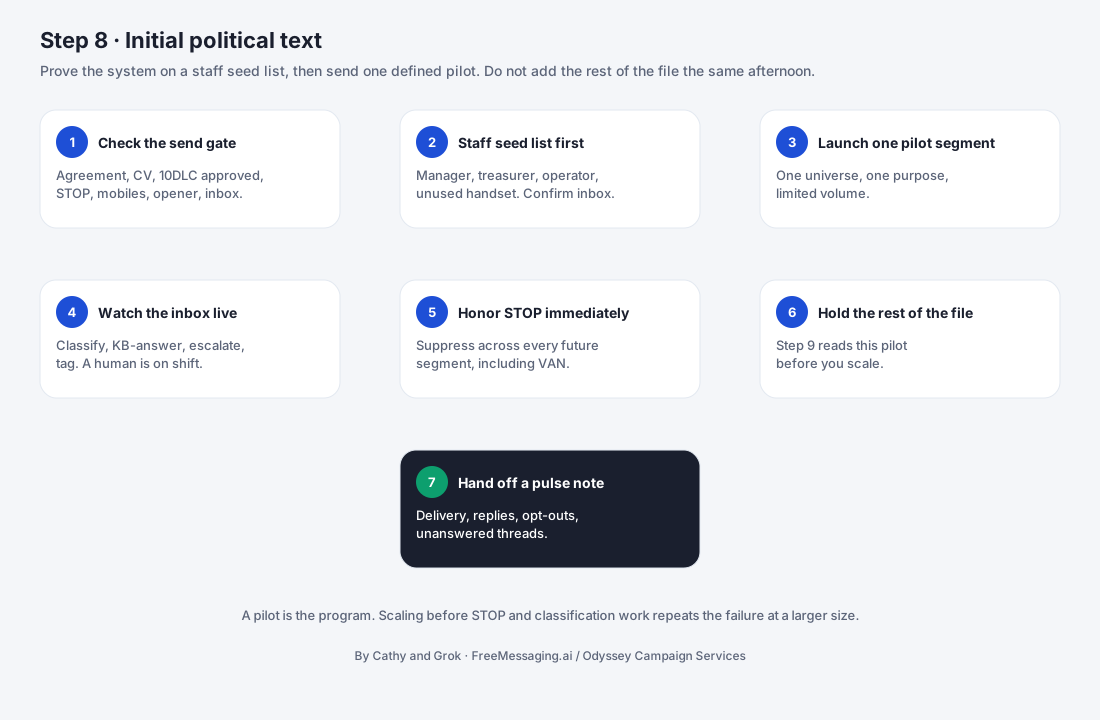

What this step accomplishes
Step 8 moves the approved messaging program from design into live campaign operations. The objective is not simply to send the first text. It is to operate the full voter journey that was approved in Step 7: activate the right audience, deliver the initial outreach, handle replies, use approved candidate knowledge, route interested voters to WhyIVote when appropriate, capture campaign signals in the Voter CRM, and create clear follow-up work for the campaign.
What it covers
- 1
Controlled launch
The launch uses the approved audience, message version, links, timing, conversation rules, suppression controls, and follow-up ownership from Step 7. Changes after launch should be controlled and documented rather than improvised inside a live program.
- 2
Live conversation management
Replies are treated as campaign interactions, not as isolated inbox messages. Each response should move through an approved path: classify the signal, answer from approved knowledge when appropriate, escalate when required, capture useful information, and define the next action.
- 3
AI-assisted handling
AI can help classify replies, retrieve campaign-approved answers from the Candidate Knowledge Base, identify relevant voter signals, and route the conversation. It should operate only within the rules approved in Step 7 and escalate unsupported, sensitive, or campaign-specific questions that require human judgment.
- 4
WhyIVote engagement
WhyIVote extends the SMS conversation when a voter wants more information. The live program can route recipients to the approved mobile candidate profile, issue content, or voter Q&A experience defined in Step 7, allowing the opening SMS to stay concise while giving interested voters more depth.
- 5
CRM capture and follow-up
Useful live responses are written back into the Voter CRM according to the approved capture rules. Supporter status, issue interest, volunteer or donor intent, event interest, questions, and follow-up needs become structured campaign data that can be acted on and analyzed in Step 9.
What your campaign provides
- 1
Final go-live approval
Confirmation that the approved audience, message, timing, candidate content, WhyIVote destinations, and response rules are ready to activate.
- 2
Live escalation contacts
Named campaign staff who can receive questions, requests, or situations that fall outside approved AI and knowledge-base handling.
- 3
Time-sensitive campaign updates
Any event changes, candidate schedule changes, policy updates, fundraising deadlines, GOTV changes, or other information that can affect live voter conversations.
- 4
Follow-up ownership
Clear assignment for volunteer, donor, event, supporter, issue, and other high-value responses that require campaign action.
- 5
Pause / stop authority
The person authorized to pause, modify, or stop a live program when the campaign needs to change direction or resolve an issue.
- 6
WhyIVote content readiness
Confirmation that the candidate profile, issue pages, Q&A, and campaign-approved destinations used by the program are current and approved.
- 7
Campaign availability
Reasonable availability during launch and early live operation so urgent escalations or newly discovered knowledge gaps can be resolved quickly.
What FreeMessaging.ai handles
- Run the final pre-launch check against the approved Step 7 program version, audience definition, suppression rules, messaging number, initial message, AI rules, WhyIVote destinations, CRM fields, and follow-up routes.
- Activate the approved campaign audience and send the initial outreach through the configured political messaging workflow.
- Monitor message processing, delivery activity, replies, opt-outs, suppression behavior, and live conversation queues.
- Use the approved AI conversation layer to classify replies, retrieve campaign-approved answers, identify useful campaign signals, and route questions that require human review.
- Route voters to the approved WhyIVote candidate profile, issue content, or Q&A experience when the messaging program calls for deeper voter education or engagement.
- Write approved response classifications, issue interests, supporter signals, conversation history, and follow-up needs into the Voter CRM.
- Route volunteer, donor, event, supporter, unresolved-question, and other follow-up tasks to the campaign-defined owner or workflow.
- Apply opt-out and suppression controls to the live program and keep those states synchronized with the campaign messaging workflow.
- Identify early operational issues, missing knowledge, weak routing, broken destinations, or unexpected reply patterns and coordinate an approved correction when needed.
- Prepare the messaging and conversation data that Step 9 will use for dashboard reporting, analysis, and optimization.
How AI and WhyIVote Operate During Live Messaging
Step 8 is where the connected design from Step 7 becomes visible to voters. FreeMessaging.ai should operate SMS, AI, WhyIVote, and the Voter CRM as one coordinated journey rather than four disconnected features.
How AI and WhyIVote Operate During Live Messaging
- 1
AI is bounded by approved knowledge
AI may use only the campaign-approved Candidate Knowledge Base and the conversation rules approved for the program. When a reply is not covered, requires campaign judgment, or falls into an escalation category, the conversation should be routed rather than answered by improvisation.
- 2
WhyIVote is used when it improves the voter journey
WhyIVote should not be inserted into every message automatically. It is used where the program objective benefits from a mobile candidate profile, deeper issue information, approved Q&A, or another voter-facing experience that cannot be communicated efficiently in a short text thread.
- 3
Live engagement creates follow-up signals
A reply, issue question, WhyIVote interaction, volunteer interest, event intent, or other defined signal may create a CRM update or campaign follow-up task when the program is configured to capture that information. The objective is to turn interaction into usable campaign memory rather than letting valuable responses disappear inside a message thread.
Information to have ready
- Approved Step 7 messaging-program brief and current version
- Final launch audience / Voter CRM segment and exclusion rules
- Approved initial SMS and any approved variants
- Active messaging number and completed launch prerequisites from Steps 1-3
- Approved Candidate Knowledge Base from Step 6
- AI reply-classification, approved-answer, escalation, and next-action rules
- Approved WhyIVote candidate profile, issue pages, Q&A destinations, and working links used by the program
- CRM fields, tags, statuses, and follow-up rules to capture from live conversations
- Opt-out / suppression state and any campaign-specific eligibility exclusions
- Campaign escalation contacts and expected response coverage during launch
- Follow-up owners for supporter, volunteer, donor, event, issue, GOTV, or other program-specific responses
- Pause / stop authority and process for approving live program changes
- Time-sensitive event, policy, candidate, fundraising, or GOTV information that may affect live conversations
What you will see
Live program status: The approved messaging program, audience, version, launch timing, and operational state.
Messaging activity: Sent/processed message activity, reply volume, opt-outs, and other operational indicators available in the messaging workflow.
Conversation queue: Incoming voter replies, classification status, AI-handled interactions, escalations, and unresolved questions.
WhyIVote handoffs: The approved candidate-profile, issue, or Q&A destinations used to give interested voters more depth.
CRM updates: Supporter status, issue interest, volunteer/donor/event intent, conversation history, questions, and follow-up needs captured from the live program.
Follow-up queue: Voters or contacts requiring a campaign action, with the responsible owner or workflow where configured.
Change log: Any approved program revisions, pauses, fixes, or knowledge-base updates introduced after launch.
Analysis-ready data: Structured messaging and response data prepared for the Step 9 dashboard and optimization process.
Watch for
- The campaign has approved the initial SMS but has not finalized who will handle escalations or high-value follow-up responses.
- The launch audience changes immediately before send, requiring suppression, eligibility, or segment logic to be revalidated.
- An issue, policy, event, or candidate question appears in live replies but is not covered by the approved Candidate Knowledge Base.
- AI is asked to answer outside the approved knowledge or conversation scope instead of escalating the question.
- WhyIVote profile, issue page, Q&A, or destination link is incomplete, outdated, or not aligned with the live message.
- Campaign staff update candidate information or messaging direction but do not communicate the change before live replies begin.
- Follow-up responsibilities are unclear, so volunteer, donor, event, supporter, or GOTV interest is captured but not acted on.
- Opt-out or suppression status from another approved campaign data source has not been reconciled before audience activation.
- Links, routing, CRM capture, or escalation paths were not tested end-to-end with representative records before launch.
- Campaign changes are made inside the live program without version control, making it difficult to understand later which message or rule produced a result.
What happens next
Once the program is live, Step 8 continues as an operating function for the duration of the campaign messaging program. FreeMessaging.ai manages the approved conversation workflow, captures response data, and routes follow-up while the campaign provides decisions, updated knowledge, and human handling where required.
Step 9 - Analyze & Optimize begins as soon as enough messaging and conversation data exists to review. The dashboard and analysis process use the delivery activity, reply classifications, supporter signals, issue interests, WhyIVote engagement where available, follow-up needs, and program outcomes captured during Step 8.
The Step 8 / Step 9 relationship is a continuous loop: launch the approved program, learn from voter interaction, improve the audience or conversation design, approve the next version, and launch again. This is how FreeMessaging.ai turns campaign texting from one-time sends into a repeatable conversation and learning system.
Public Knowledge Base note: This procedure describes the general FreeMessaging.ai live messaging and conversation-management workflow. Campaign-specific audiences, scripts, candidate positions, voter/contact data, live conversation content, and follow-up decisions are private campaign information and should be used only within the campaign-approved scope. FreeMessaging.ai public service knowledge, campaign-specific Candidate Knowledge Base content, WhyIVote voter-facing content, and Voter CRM data remain separate knowledge layers.
Questions
What is Step 8 of FreeMessaging.ai onboarding?
Activate the approved messaging program, send the initial outreach, manage live two-way voter conversations, use AI and WhyIVote according to the campaign-approved design, capture useful response data in the Voter CRM, and route follow-up work for the campaign.
Does this step require Odyssey Campaign Services?
No. The nine-step onboarding is part of the standard FreeMessaging.ai service. OCS is optional paid execution support.