
Onboarding procedure
Contact Data
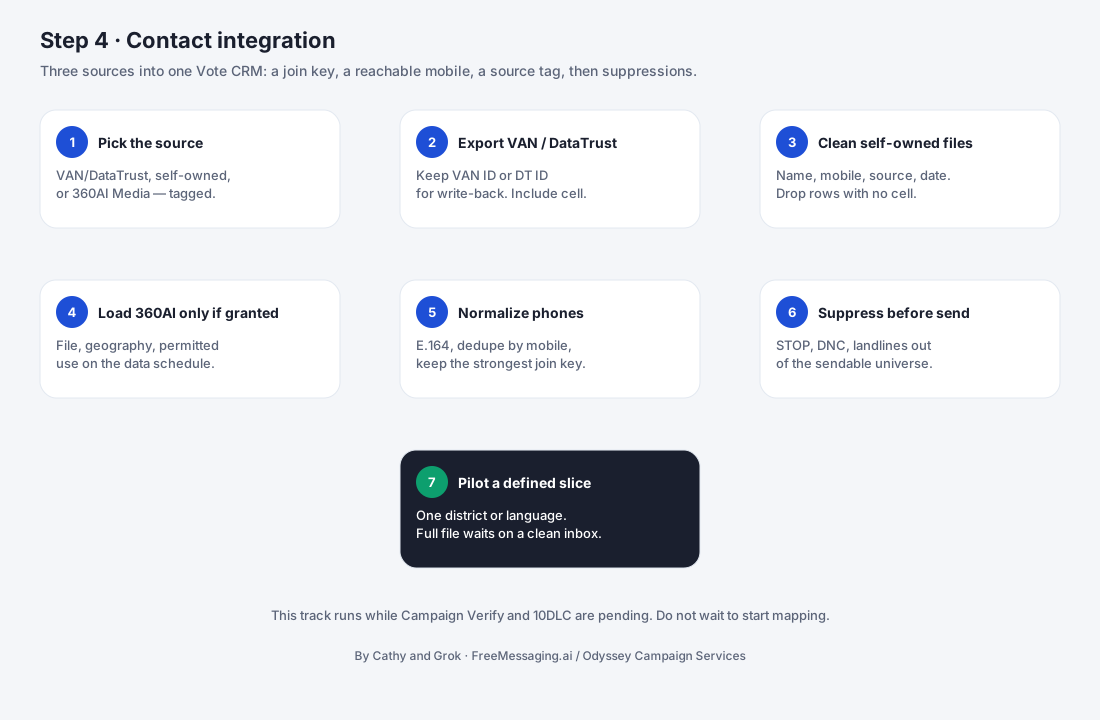
Bring authorized campaign contact sources into one organized, source-tracked dataset so FreeMessaging.ai can build the voter CRM, define outreach audiences, and prepare the campaign for messaging.

What this step accomplishes
Campaign contact data often exists in several systems and files. Step 4 brings those authorized sources together, standardizes the records, and preserves where each contact came from before the information is loaded into the voter CRM.
FreeMessaging.ai treats contact-source integration as a data-preparation step, not as permission to message every record. Source access, permitted use, suppression requirements, and the campaign’s messaging/compliance decisions remain part of the operating workflow.
The typical contact universe can include three source groups:
What it covers
- 1
Party / authorized voter data
VAN for Democratic campaigns, Data Trust-linked or other authorized Republican voter-data sources, or another voter-file source the campaign is entitled to use. Access method depends on the campaign’s existing permissions and provider relationship.
- 2
Campaign-owned data
Existing supporter, donor, volunteer, event, petition, website, fundraising, phone-bank, and prior-outreach lists owned or controlled by the campaign.
- 3
Approved supplemental outreach data
Additional contact sources approved for the campaign program, including supplemental small-business-owner contact data sourced through 360AI Media when included in the agreed FreeMessaging.ai outreach scope and permitted for the intended use.
What your campaign provides
- 1
Authorized voter-data access or exports
Where applicable, access or approved exports from VAN, Data Trust-linked sources, another voter file, or the campaign’s existing data provider. The campaign must have authority to provide or connect the data.
- 2
Campaign-owned contact files
Current supporter, donor, volunteer, event, fundraising, signup, and other campaign-managed contact lists that should be considered for the messaging program.
- 3
Field definitions and source context
Enough information to understand what each file and field means, including source IDs, voter/supporter status fields, geography, audience labels, and relevant historical fields.
- 4
Suppression and opt-out information
Current do-not-contact, opt-out, suppression, or other exclusion information that should carry forward into the FreeMessaging.ai data environment.
- 5
Audience and data-use priorities
Direction on which sources and segments should be prepared first and any known restrictions on how particular data sources may be used.
- 6
Approval for supplemental data
If the campaign will use supplemental outreach data, approval of the audience definition, geographic scope, and intended messaging purpose.
What FreeMessaging.ai handles
- Create a source inventory showing which party, campaign-owned, and supplemental datasets will be used.
- Coordinate secure receipt of exports or connection information using the method appropriate for the campaign and provider.
- Profile incoming files and map source-specific fields into a common FreeMessaging.ai contact structure.
- Normalize names, phone numbers, email addresses, geography, addresses, dates, and other fields needed for matching and segmentation.
- Deduplicate records across sources while preserving source provenance, source IDs, and materially different campaign attributes.
- Carry forward campaign-provided suppression, opt-out, exclusion, and contact-status data into the import-ready dataset.
- Flag records with missing, malformed, conflicting, or incomplete fields for campaign review rather than silently inventing values.
- Add approved supplemental outreach data where the campaign has requested it and the data is within the agreed scope.
- Prepare the unified contact dataset and mapping documentation for Step 5 — Build the Voter CRM.
Information to have ready
- Campaign data owner / authorized staff contact
- List of contact sources to be included in the first messaging program
- Authorized VAN, Data Trust-linked, voter-file, or other provider access / export where applicable
- Current campaign-owned supporter, donor, volunteer, event, fundraising, and signup files
- Source IDs or field dictionaries where available
- Current opt-out, suppression, do-not-contact, and exclusion lists
- Geographic and audience priorities for the first program
- Approval and scope for supplemental small-business-owner or other outreach data, if used
- Known source-use restrictions or provider-specific requirements
- Preferred secure transfer / connection method and expected data-refresh cadence
What you will see
Source inventory: A list of every campaign contact source included in the onboarding scope and its owner/provider.
Field mapping: A record of how important source fields map into the FreeMessaging.ai contact structure.
Data-quality summary: Counts or exceptions for missing phone numbers, malformed records, duplicate candidates, and conflicting attributes.
Source attribution: Tags and source identifiers showing where each consolidated contact originated.
Suppression status: Campaign-provided opt-out or exclusion data carried into the campaign-ready dataset.
Initial audience counts: Usable record counts by source, geography, or priority segment where available.
Step 5 readiness: A CRM-ready dataset and mapping package that can be loaded into the voter CRM.
Watch for
- The campaign does not yet have authorized access to its party voter file or data provider.
- Exports arrive with missing field definitions, unknown codes, inconsistent column names, or different schemas across files.
- The same voter appears in multiple sources with conflicting phone, address, support-status, or identity information.
- Suppression / opt-out history is incomplete or is stored separately from the main campaign contact lists.
- Source-specific IDs needed for future synchronization are missing from the export.
- Phone numbers are missing, malformed, shared across multiple people, or not clearly associated with the intended contact.
- The campaign changes its target geography or first messaging audience after mapping and quality work has begun.
- A third-party data provider controls export/API permissions or timing and FreeMessaging.ai cannot independently accelerate that provider’s approval process.
- Supplemental data scope has not yet been approved or the intended use requires additional campaign/compliance review.
What happens next
Once the campaign contact sources are organized, normalized, deduplicated, source-tagged, and reviewed, Step 5 — Build the Voter CRM begins. The CRM adds the campaign operating layer: voter/supporter status, conversation history, issue interests, messaging-program participation, follow-up fields, and future updates.
The contact dataset can continue to be refreshed after onboarding. New campaign-owned records, updated voter-file exports, and approved supplemental sources should enter through the same source-tracked process so the CRM remains consistent and auditable.
Public Knowledge Base note: This procedure describes the FreeMessaging.ai contact-data onboarding workflow. Access to VAN, Data Trust-linked sources, other voter files, and third-party datasets is subject to the campaign’s authorization, provider agreements, applicable requirements, and the intended messaging program. FreeMessaging.ai does not treat possession of contact data as a substitute for required messaging compliance.
Questions
What is Step 4 of FreeMessaging.ai onboarding?
Bring authorized campaign contact sources into one organized, source-tracked dataset so FreeMessaging.ai can build the voter CRM, define outreach audiences, and prepare the campaign for messaging.
Does this step require Odyssey Campaign Services?
No. The nine-step onboarding is part of the standard FreeMessaging.ai service. OCS is optional paid execution support.