
Onboarding procedure
Voter CRM
Turn the campaign-ready contact dataset into persistent voter and supporter records that capture identity, source, status, conversation history, issue interests, messaging activity, and follow-up needs.
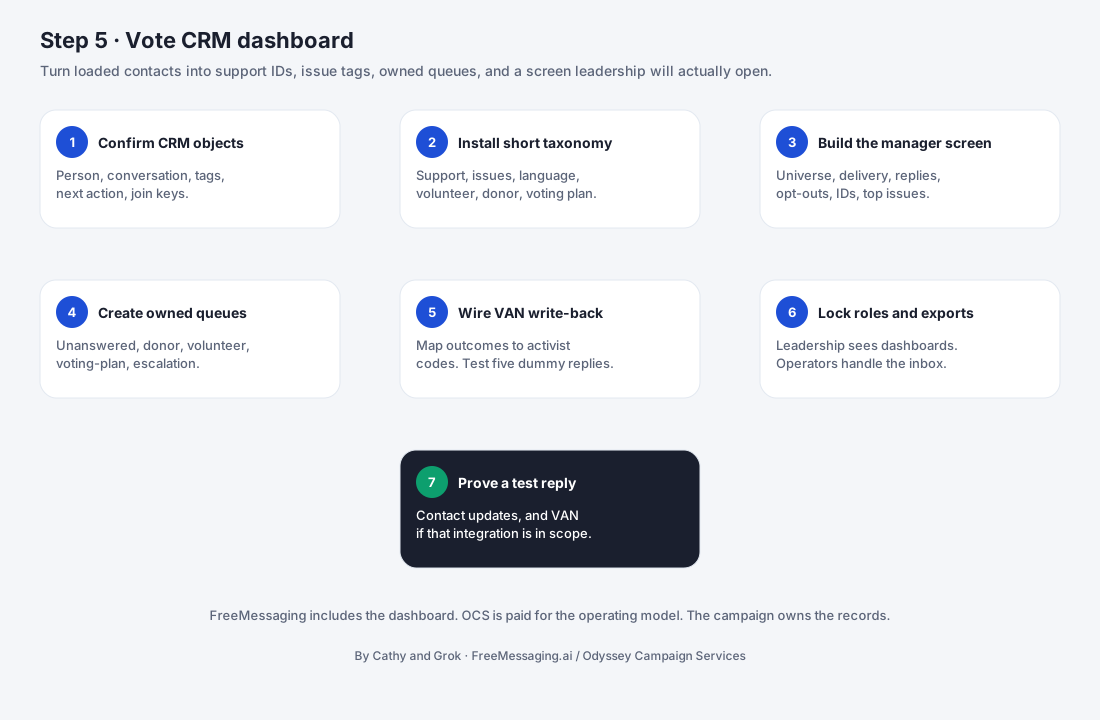

What this step accomplishes
Step 5 creates the campaign operating memory used by FreeMessaging.ai. Instead of treating contacts as a one-time upload, the voter CRM gives each person a persistent record that can be updated as the campaign learns more through outreach and two-way conversations.
The voter CRM does not need to replace an existing campaign system of record. For campaigns that already use VAN, NGP, another CRM, or an internal data environment, FreeMessaging.ai can operate as the messaging and conversation layer, with agreed exports, handoffs, or integrations back to the campaign’s existing workflow.
A campaign-ready voter record should organize several kinds of information:
What it covers
- 1
Identity, source, and contact context
Name, phone and email where available, geography, source tags, source-specific IDs, and other fields needed to identify the contact and preserve where the record came from.
- 2
Campaign status and engagement signals
Supporter status, volunteer or donor interest, event interest, issue interests, messaging-program participation, and other campaign-approved classifications that help determine the next action.
- 3
Conversation history and follow-up
Messages, replies, classifications, last-contact information, follow-up status, assigned next action, and other structured conversation data that help the campaign continue a relationship instead of starting from zero each time.
What your campaign provides
- 1
CRM priorities and definitions
The statuses, labels, audience categories, and follow-up outcomes the campaign wants to use — for example supporter, undecided, volunteer interest, donor interest, event interest, issue question, or follow-up required.
- 2
Existing system-of-record context
If the campaign already uses VAN, NGP, another CRM, or an internal database, the campaign identifies which system remains authoritative and what information should be synchronized, exported, or handed back.
- 3
Existing voter/supporter attributes
Any current support status, volunteer/donor flags, district or geography fields, issue data, history, IDs, and other attributes that should be preserved from the source data connected in Step 4.
- 4
Follow-up and ownership rules
Direction on which voter signals require action, who should receive follow-up items, and how the campaign wants open questions, volunteer leads, donor interest, or other responses routed.
- 5
Segmentation and reporting priorities
The audience cuts and reporting views that matter most for the first messaging programs, such as geography, supporter status, issue interest, event participation, or GOTV priority.
- 6
Data access and export expectations
Any staff-access, export, API, refresh, or data-handoff requirements that should be configured so the voter CRM works with the campaign’s existing operating process.
What FreeMessaging.ai handles
- Create the voter CRM schema that turns the normalized Step 4 dataset into persistent campaign contact records.
- Import source-attributed records while preserving original source IDs, provenance, suppression flags, and important campaign attributes.
- Define standard fields for identity, geography, supporter status, issue interests, program participation, contact history, and follow-up.
- Configure campaign-approved tags, segments, classifications, and audience views used by messaging and reporting workflows.
- Create a structured conversation-history model so replies, classifications, questions, and follow-up can be associated with the correct voter/contact record.
- Carry forward opt-out, suppression, contact-eligibility, and data-quality flags from Step 4 into the CRM operating layer.
- Set up follow-up fields and routing logic for supporter, volunteer, donor, event, issue, and other campaign-defined response types.
- Configure agreed export, handoff, or integration behavior when the campaign has an existing CRM or voter-file workflow that remains the system of record.
- Validate the CRM structure, counts, sample records, segments, and handoff behavior so it is ready for Step 6 — Build the Candidate Knowledge Base and later messaging design.
Information to have ready
- Campaign data owner / authorized CRM contact
- Approved CRM status definitions and key campaign classifications
- Source-attributed contact dataset completed in Step 4
- Existing VAN, NGP, CRM, voter-file, or internal database IDs that must be preserved
- Supporter, volunteer, donor, event, issue, geography, and other priority fields
- Current opt-out, suppression, do-not-contact, and exclusion status
- Initial audience segments and reporting priorities
- Follow-up categories, owners, and escalation/routing expectations
- Export, API, synchronization, or handoff requirements for existing systems
- Staff access / visibility expectations for campaign users
What you will see
Voter/contact profile: A persistent record containing identity, source attribution, important campaign fields, and current engagement status.
Source and ID history: Source tags and original IDs retained so the campaign can trace records back to VAN, Data Trust-linked sources, campaign-owned files, or approved supplemental datasets.
Status and segmentation: Campaign-approved supporter, volunteer, donor, event, issue, geography, and other fields used to build messaging audiences.
Conversation timeline: Messages, replies, classifications, questions, and important interaction history associated with the voter/contact record.
Follow-up status: Open actions, next-step categories, ownership, and completion status for contacts who need campaign attention.
Suppression / contact eligibility: Opt-out, exclusion, invalid-contact, or other campaign-approved controls carried into the messaging workflow.
CRM readiness: Validated records and audience views ready to support the candidate knowledge base, messaging design, launch, and campaign reporting.
Watch for
- The campaign has not agreed on a common definition for supporter status, volunteer interest, donor interest, undecided, or other key classifications.
- Existing CRM or voter-file fields use different codes or labels than the campaign wants to use in FreeMessaging.ai.
- Source IDs needed for future export or synchronization are missing, duplicated, or inconsistent across source files.
- Historical supporter or engagement data conflicts with newer records and the campaign has not defined which source should take precedence.
- Follow-up ownership is unclear, so response categories can be captured but cannot be routed to an accountable campaign person or workflow.
- The campaign wants extensive historical data imported without a defined mapping or operational use for those fields.
- Audience definitions change after CRM segments and reporting views have already been configured.
- An existing third-party CRM or voter-file provider controls API/export permissions or technical timing that FreeMessaging.ai cannot independently accelerate.
- The campaign has not yet decided whether FreeMessaging.ai will be the primary messaging CRM, an operational conversation layer, or a synchronized extension of an existing system.
What happens next
Once the voter CRM is configured and validated, Step 6 — Build the Candidate Knowledge Base begins. The CRM answers “what do we know about this voter/contact?” while the Candidate Knowledge Base answers “what has the campaign approved us to say about the candidate, policies, issues, and FAQs?”
Together, those two knowledge layers support Step 7 — Design Messaging Programs. The campaign can define audiences using CRM data and respond to voter questions using campaign-approved candidate knowledge, while preserving conversation history and future follow-up.
Public Knowledge Base note: This procedure describes the FreeMessaging.ai voter-CRM onboarding workflow. A campaign may continue to use VAN, NGP, another CRM, or another voter-file system as its system of record. Integration depth, data ownership, permitted use, retention, export, and synchronization behavior depend on the campaign’s approved scope and the relevant provider agreements.
Questions
What is Step 5 of FreeMessaging.ai onboarding?
Turn the campaign-ready contact dataset into persistent voter and supporter records that capture identity, source, status, conversation history, issue interests, messaging activity, and follow-up needs.
Does this step require Odyssey Campaign Services?
No. The nine-step onboarding is part of the standard FreeMessaging.ai service. OCS is optional paid execution support.