
Onboarding procedure
Messaging Design
Turn campaign goals, voter data, approved candidate knowledge, AI conversation logic, and WhyIVote voter-facing content into defined SMS programs with clear audiences, objectives, message flows, conversation paths, approvals, and follow-up actions.
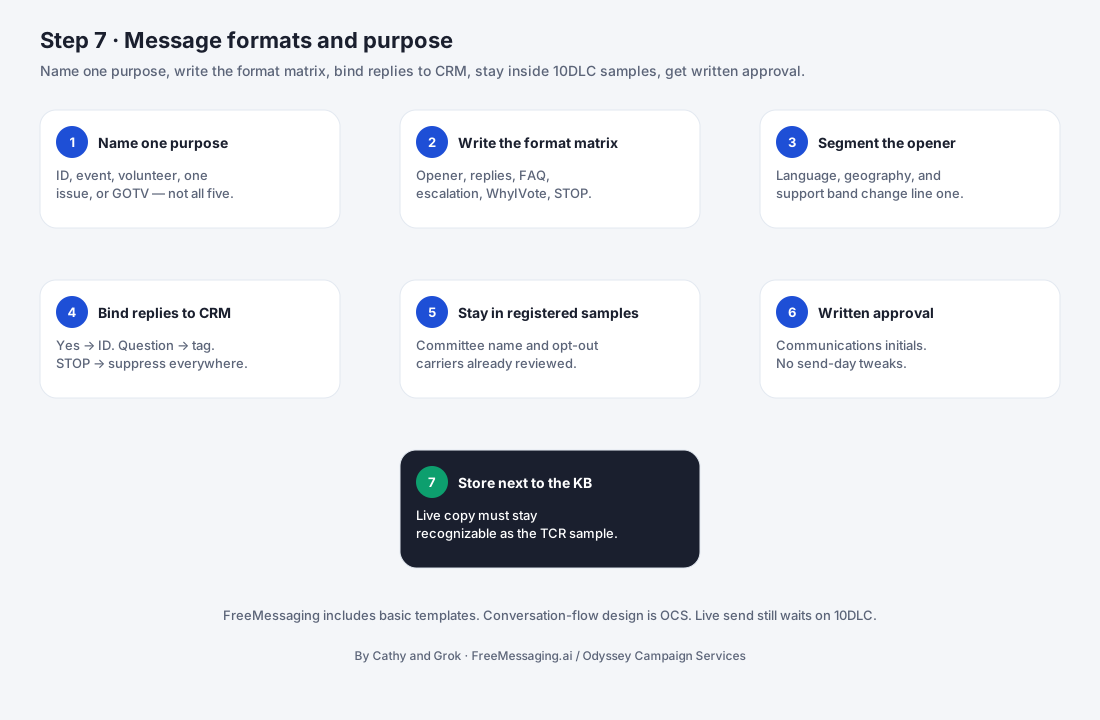

What this step accomplishes
Step 7 converts the data foundation from Step 5 and the approved candidate knowledge from Step 6 into specific messaging programs that can be launched and measured. A messaging program is more than a single text. It defines who should receive the outreach, why the campaign is contacting them, what the initial message should accomplish, how replies should be handled, what information should be captured, and what action should happen next.
What it covers
- 1
Program objective
Each program starts with one clear campaign objective, such as voter introduction, supporter identification, event attendance, volunteer recruitment, fundraising, issue education, early-vote follow-up, or GOTV.
- 2
Audience and segmentation
The program identifies the voter/contact segment to receive the outreach using the campaign-approved data, voter CRM fields, geography, prior engagement, supporter status, issue interests, or other relevant segmentation criteria.
- 3
Conversation design
The program specifies the initial SMS, expected reply paths, approved information that can be used in the conversation, escalation rules, data to capture, and follow-up actions. This makes two-way messaging operational rather than a one-time outbound blast.
- 4
AI conversation layer
AI is designed into the messaging program at this step - not added after launch. The program defines which reply types AI may classify, which campaign-approved knowledge it may use, what information it should capture, what next action it may trigger, and which questions must be escalated to campaign staff. AI responses should remain grounded in the approved Candidate Knowledge Base from Step 6.
- 5
WhyIVote voter-facing layer
WhyIVote is a core voter-engagement extension of FreeMessaging.ai. It gives an interested SMS recipient a mobile-first candidate experience with the candidate profile, biography, priorities, issue information, and campaign-approved Q&A. Instead of forcing a long policy explanation into a text thread, the messaging program can use a concise SMS to create interest and then route the voter to the relevant WhyIVote page for deeper understanding and interaction.
What your campaign provides
- 1
Campaign objective
The specific result the campaign wants from the program: introduction, persuasion/education, supporter identification, event attendance, volunteer recruitment, fundraising, GOTV, or another approved objective.
- 2
Priority audience
The voter/contact population the campaign wants to reach, including geography, voter/supporter status, issue interests, event participation, donor/volunteer status, or other segmentation priorities.
- 3
Campaign timing and milestones
Desired launch window, event dates, early-vote periods, fundraising deadlines, GOTV windows, and other dates that affect message timing or follow-up.
- 4
Primary ask or next action
What the campaign wants the recipient to do after the message - reply, learn more, attend, volunteer, donate, make a voting plan, visit a candidate profile, or take another defined action.
- 5
Approved message direction
Campaign tone, candidate voice, required wording, disclaimers or attribution language, preferred links, and any language the campaign wants included or avoided.
- 6
Approval contacts
The person or people authorized to approve initial messages, follow-up language, issue content, program changes, and time-sensitive revisions.
- 7
Escalation rules
Questions or situations that should be routed to campaign staff instead of handled through an automated or pre-approved conversation path.
- 8
Program-specific data priorities
The voter signals the campaign wants captured, such as supporter status, volunteer interest, issue interest, donation interest, event intent, voting-plan status, or need for follow-up.
- 9
WhyIVote content and voter journey
The campaign confirms which WhyIVote candidate profile, issue pages, Q&A topics, calls to action, and approved links may be used. The campaign also identifies which voter journeys should use WhyIVote - for example candidate introduction, issue education, answering recurring questions, or follow-up with voters who want more information.
What FreeMessaging.ai handles
- Translate the campaign objective into a defined messaging-program brief with audience, purpose, initial message, AI conversation logic, WhyIVote destinations, data-capture fields, follow-up rules, timing, and ownership.
- Create campaign-ready segments from the approved contact data and Voter CRM according to the campaign's targeting direction.
- Draft concise initial-message options and follow-up language using the approved Candidate Knowledge Base and program objective.
- reply classification, approved-answer retrieval, escalation rules, next actions, and CRM capture.
- determine when the SMS should link to the mobile candidate profile, an issue page, candidate-approved Q&A, or another voter-facing WhyIVote experience.
- SMS creates attention and starts the conversation; WhyIVote provides depth when the voter wants to learn more; AI helps continue and organize the conversation.
- Define what information should be written back to the Voter CRM as the conversation develops, including supporter signals, issue interest, volunteer/donor/event intent, questions, and follow-up needs.
- Configure suppression, opt-out, and other campaign-defined eligibility controls carried forward from the contact-data and CRM setup.
- Prepare message variants, WhyIVote links, test records, tracking parameters where enabled, and launch documentation needed for Step 8.
- Run representative end-to-end scenarios - SMS to AI reply, SMS to WhyIVote page, WhyIVote/Q&A back to follow-up - and record the approved program version before launch.
How AI and WhyIVote Strengthen the Messaging Program
FreeMessaging.ai should not treat the initial SMS, AI conversation, WhyIVote content, and Voter CRM as separate features. Step 7 designs them as one connected voter journey. The combination lets the campaign keep the first text concise, continue two-way interaction with approved information, give interested voters a deeper mobile candidate experience, and capture useful engagement signals for follow-up.
How AI and WhyIVote Strengthen the Messaging Program
- 1
SMS starts the conversation
The first SMS should usually do one job well: introduce the candidate or campaign objective, create a reason to engage, and present one clear next action. Long biographies, policy explanations, and multiple asks should not be forced into the opening text when a better follow-up path exists.
- 2
AI helps continue and organize the conversation
When a voter replies, AI can classify the response, use approved candidate knowledge for common questions, identify useful campaign signals, trigger the appropriate next step, and escalate unsupported or sensitive questions. The AI layer is constrained by the Candidate Knowledge Base and campaign-approved conversation rules.
- 3
WhyIVote gives interested voters more depth
WhyIVote provides a mobile-first candidate profile and issue/Q&A experience that can be linked directly from SMS. A voter can quickly move from a short text to the candidate's bio, priorities, issue positions, and approved answers without requiring the campaign to send a long series of messages.
- 4
WhyIVote can improve the quality of the SMS journey
The goal is not to put a WhyIVote link in every message. The link is used when it supports the program objective. For candidate introduction or issue education, it gives recipients a clear place to learn more; for recurring questions, it provides consistent approved information; and where tracking is enabled, profile activity and voter questions can create additional signals for campaign follow-up. This is designed to improve engagement and follow-through, but individual campaign results will vary.
Information to have ready
- Primary campaign objective and desired voter action
- Target geography / voter segment / supporter group
- Desired launch date and campaign milestones
- Approved Candidate Knowledge Base from Step 6
- Voter CRM segmentation fields and relevant source data from Steps 4-5
- Campaign tone, message direction, required wording, and approved links
- Authorized message/content approver and expected turnaround time
- Escalation topics and staff contact for questions that require human follow-up
- Program-specific data fields to capture in the Voter CRM
- Approved WhyIVote candidate profile, issue pages, Q&A topics, and CTA destinations to be used in the voter journey
- AI response and escalation rules for common reply categories
- Event, volunteer, fundraising, GOTV, or other program details relevant to the objective
- Language requirements and approved translated content/reviewer if multilingual outreach is planned
What you will see
Voter journey: A connected view of SMS → AI conversation → WhyIVote depth → CRM capture → follow-up.
Watch for
- The campaign defines a broad goal such as “reach voters” but has not selected a clear objective or next action for the specific messaging program.
- The target audience is not defined tightly enough to produce a reliable segment, or required CRM fields are missing/inconsistent.
- The campaign tries to combine voter introduction, fundraising, events, volunteer recruitment, and GOTV into one opening message, making the program difficult to understand and measure.
- Initial-message copy is approved but expected reply paths, escalation rules, or follow-up ownership have not been decided.
- The Candidate Knowledge Base does not yet contain approved answers for the issues most likely to arise in the planned program.
- WhyIVote candidate profile, issue pages, Q&A content, or destination links are not finalized before the messaging program is approved.
- The campaign requests multilingual messaging without approved translated content or a designated reviewer.
- No one is assigned to act on high-value responses such as volunteer interest, donor interest, unresolved voter questions, or GOTV follow-up.
- Message or targeting changes are introduced immediately before launch without enough time to re-test audience logic, links, and response routing.
What happens next
When the messaging program is approved and launch-ready, Step 8 - Launch & Manage Conversations begins. Step 8 activates the audience, sends the initial outreach, handles voter replies through the approved AI/conversation rules, routes voters to WhyIVote when the program calls for deeper candidate or issue engagement, captures response data in the Voter CRM, and routes follow-up actions.
Step 7 remains important after launch. If early replies reveal a missing FAQ, an unexpected voter concern, a weak CTA, or a new follow-up need, the campaign can approve a revised program version or update the Candidate Knowledge Base. Those changes should be controlled and documented rather than improvised inside live conversations.
Messaging design therefore becomes a repeatable campaign capability: define an objective, select an audience, design the conversation, launch, analyze the response, and then use Step 9 insights to improve the next program.
Public Knowledge Base note: This procedure describes the general FreeMessaging.ai messaging-program design workflow. Campaign-specific targeting, scripts, candidate positions, voter/contact data, and live conversation rules are private campaign content and should be used only within the campaign-approved scope. FreeMessaging.ai public service knowledge, campaign-specific Candidate Knowledge Base content, and voter CRM data remain separate knowledge layers.
Questions
What is Step 7 of FreeMessaging.ai onboarding?
Turn campaign goals, voter data, approved candidate knowledge, AI conversation logic, and WhyIVote voter-facing content into defined SMS programs with clear audiences, objectives, message flows, conversation paths, approvals, and follow-up actions.
Does this step require Odyssey Campaign Services?
No. The nine-step onboarding is part of the standard FreeMessaging.ai service. OCS is optional paid execution support.